mirror of
https://git.sanhost.net/sanasol/hytale-f2p.git
synced 2026-06-17 03:12:35 -04:00
 a2b60ba3a0
Replace README with short deprecation notice pointing to f2p-evo.
Add deprecation headers to SERVER.md, TROUBLESHOOTING.md, server/README.md.
Remove CloudNord advertising, buymeacoffee links, and Discord references.
Update Docker URLs from Hybrowse to sanasol, fix contact links.

Co-Authored-By: Claude Opus 4.6 <noreply@anthropic.com>
Deprecated: For the new F2P Evo launcher, see F2P Evo Server Scripts.
Hytale F2P - Dedicated Server
Host your own Hytale server. The scripts handle everything automatically.
Prerequisites
- Java 25+ — Windows installer | Other platforms
- If you have the F2P launcher installed, its bundled Java will be used automatically
- Internet connection for first launch (downloads ~3.5 GB of game files)
- If you have the F2P launcher installed, game files are copied locally (no download needed)
Video Guide
Quick Start
Free Hosted Server (no PC required)
Use play.hosting to get a free Hytale server with F2P support:
- Register at play.hosting
- Create a Hytale server
- Start the server once and wait for it to fully load
- Go to Files → open the
modsfolder - Click New → File via URL
- Paste:
https://github.com/sanasol/hytale-auth-server/releases/latest/download/dualauth-agent.jar - Click Query and download the file
- Go to Console and Restart the server
Done — your F2P server is ready to join.
Windows (self-hosted)
- Download
start.batto an empty folder - Double-click
start.bat - Done — server starts on port 5520
Linux / macOS (self-hosted)
mkdir hytale-server && cd hytale-server
curl -O https://git.sanhost.net/sanasol/hytale-f2p/raw/branch/develop/server/start.sh
chmod +x start.sh
./start.sh
What the scripts do
- Search for the F2P launcher install (default paths + custom
installPathfrom config) - Use bundled Java from the launcher, or fall back to system Java (25+ required)
- Copy game files from the launcher install if available
- Download missing files:
HytaleServer.jar(~150 MB),Assets.zip(~3.3 GB),dualauth-agent.jar(~5 MB) - Check for updates on every launch (server, assets, and agent)
- Generate a persistent server ID
- Fetch authentication tokens
- Start the server with dual-auth support
Connecting
- Same PC: Connect to
localhost:5520or127.0.0.1:5520 - LAN: Connect to your local IP (e.g.
192.168.1.x:5520) - Internet: Forward port
5520(TCP + UDP) on your router, friends connect to your public IP
No public IP? Use playit.gg (recommended)
If you're behind CGNAT or can't port forward, playit.gg gives you a public address for free:
- Go to playit.gg and create an account
- Download and run the playit agent
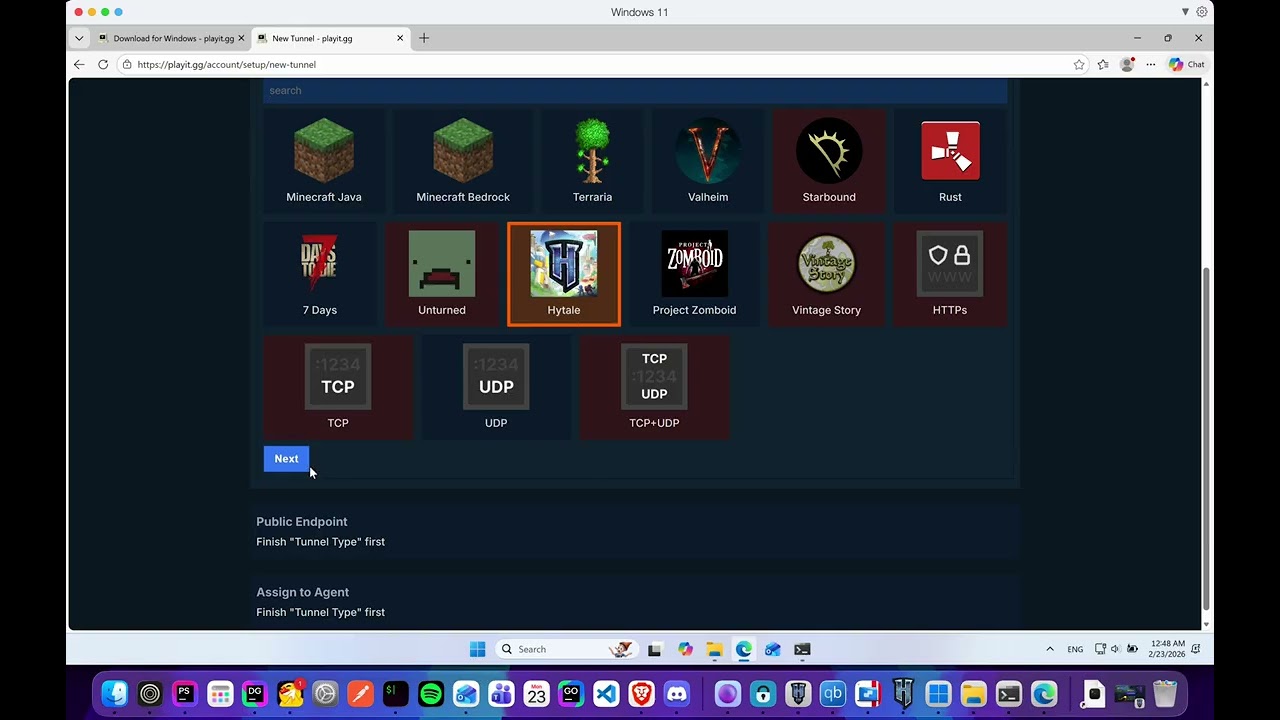
- Create a tunnel — select Hytale as the game type, local port
5520 - Share the generated address with friends (e.g.
something.joinplayit.gg:12345)
Other options
- Radmin VPN — virtual LAN, all players must install it
- ZeroTier — same idea, create a network, friends join and connect via VPN IP
Configuration
Set environment variables before running the script:
| Variable | Default | Description |
|---|---|---|
SERVER_NAME |
My Hytale Server |
Server name shown in listings |
BIND_ADDRESS |
0.0.0.0:5520 |
IP and port to listen on |
JVM_XMX |
(Java default) | Max memory (e.g. 4G, 8G) |
JVM_XMS |
(Java default) | Initial memory |
AUTH_MODE |
authenticated |
Auth mode (authenticated or none) |
HYTALE_AUTH_DOMAIN |
auth.sanasol.ws |
Auth server domain |
DOWNLOAD_BASE |
https://download.sanasol.ws/download |
File download URL |
Example (Linux):
SERVER_NAME="Epic Server" JVM_XMX=4G ./start.sh
Example (Windows):
set SERVER_NAME=Epic Server
set JVM_XMX=4G
start.bat
Files created
your-folder/
├── start.sh / start.bat     # Startup script
├── HytaleServer.jar          # Game server (auto-downloaded)
├── Assets.zip                 # Game assets (auto-downloaded)
├── dualauth-agent.jar         # Auth agent (auto-downloaded)
├── .server-id                 # Persistent server UUID
├── .versions/                 # Version tracking for auto-updates
├── Server/                    # Server data (created by server)
│   ├── config.json
│   └── worlds/
└── UserData/                  # Player saves
Troubleshooting
| Problem | Solution |
|---|---|
java not found |
Install the F2P launcher (includes Java) or install Java 25+ from adoptium.net |
| Download fails | Check internet connection. Files can be downloaded manually from https://download.sanasol.ws/download/ |
| Port already in use | Change port: BIND_ADDRESS=0.0.0.0:5521 ./start.sh |
| Out of memory | Set more RAM: JVM_XMX=4G ./start.sh |
| Friends can't connect | Forward port 5520 (TCP+UDP) on your router, or use playit.gg if you can't port forward |
Community
Need help? Join the community: Community Chat | TG Group | TG Channel